

Library — overview
The Library tab (second bottom bar button) is the catalog of your published content: service or study notes, and personal journal entries. It is not Home (resume and shortcuts), Create (drafts), or Search (Bible text).
This guide sets the foundation before detailed pages (search, filters, drafts vs published).
→ Create hub · Notes overview · Journal overview
What is the Library for?
Section titled “What is the Library for?”| Need | What you do here |
|---|---|
| Find a published note or entry | List, search, sort, favorites |
| Read comfortably | Tap a row → Read (notes) or Journal (entries) |
| Favorite | Star on list card or in read mode |
| Fix later | Read → ⋮ → New version… → draft under Create |
| Share a note | Note read → Export as PDF… (connection required) |
The Library is not for writing a first draft — use Create.
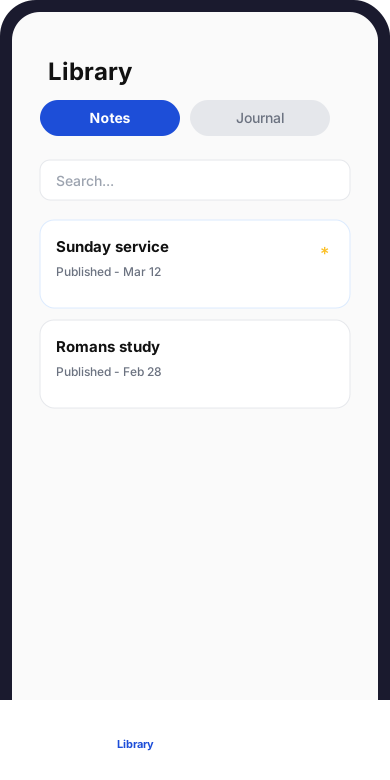
Library tab — Notes segment: search bar, note cards, and favorites.
Library, Home, Create, Search
Section titled “Library, Home, Create, Search”| Tab | Role | Typical content |
|---|---|---|
| Home | Dashboard, resume, quick actions | Recent drafts, today’s Tracking, shortcuts |
| Library | Published catalog | Published notes + journal |
| Create | Draft workshop | Unpublished notes and journal |
| Search | Bible text (reference, keywords) | Scripture — To find your personal notes, use the Library tab — this is not the same as Bible search. |
| Tracking | Reading, prayer, meditation | Daily activities |
flowchart LR C[Create draft] -->|Publish| B[Library] B -->|New version| C R[Bible Search] -.->|verses to draft| CLibrary screen layout
Section titled “Library screen layout”Notes | Journal segment
Section titled “Notes | Journal segment”At the top, a segmented control (Library: notes or journal):
| Segment | List shown |
|---|---|
| Notes | Published notes only |
| Journal | Published journal entries only |
The active segment changes the list; search and Favorites filter are shared between segments (same query if you switch).
Toolbar (below segment)
Section titled “Toolbar (below segment)”| Area | Notes | Journal |
|---|---|---|
| Search | Search title, summary, speaker, or location | Search the journal |
| Sort (Sort the list) | Updated, created, title A→Z / Z→A | Same + Entry date (newest / oldest) |
| Event type filter | Filter button (service, study…) | — |
| Chips | All notes (count) · Favorites only (count) | Same chip labels (counts for active segment) |
List gestures
Section titled “List gestures”| Gesture | Effect |
|---|---|
| Tap a row | Opens read (note or journal) |
| Star on card | Toggle favorite |
| Pull down | Refresh list |
| Scroll to bottom | Loads next page when list is long |
Golden rule: published only
Section titled “Golden rule: published only”| Status | Where to find it |
|---|---|
| Draft | Create → Notes or Journal segment — not in the Library |
| Published | Library → matching segment |
Empty states (nothing published yet):
| Segment | Title | Subtitle |
|---|---|---|
| Notes | No published notes yet | Only published content appears in the Library. Create a note under Create, then publish it. |
| Journal | No published journal entries yet | Only published content appears in the Library. Create and publish an entry from Create. |
There is no “Drafts only” filter in the current Library (drafts live under Create only).
Open published content
Section titled “Open published content”- Library → Notes → tap a note.
- Read screen (app bar title).
- Common actions: favorite, ⋮ menu (New version…, Export as PDF…).
Journal
Section titled “Journal”- Library → Journal → tap an entry.
- Journal read screen.
- Common actions: favorite, ⋮ → New version… (no journal PDF export).
Edit published text
Section titled “Edit published text”You do not edit body text in place in the Library:
- New version… from read mode.
- Edit the draft under Create (or editor route from Library).
- Publish to replace the visible version.
Errors and loading
Section titled “Errors and loading”| Situation | Display | Action |
|---|---|---|
| Initial load | Center spinner | Wait |
| Network failure | Could not load — Check your connection and try again. | Retry button |
| Empty list (no active search) | “No published notes / entries” + Create subtitle | Create → publish |
| Search or filter with no match | Empty list area | Clear search (clear icon) or turn off Favorites only |
All notes / Favorites counts help see if a filter hides everything.
Offline
Section titled “Offline”| Case | Behavior |
|---|---|
| Cached list | Cards may show offline |
| First load without network | Could not load error |
| Favorite / server actions | May fail offline — retry when online |
Sync banner may appear elsewhere; publish and PDF still need network.
→ Sync
Typical flows
Section titled “Typical flows”| Goal | Flow |
|---|---|
| Reread a published sermon note | Library → Notes → search or scroll → Read |
| Find a journal entry from a month | Library → Journal → sort Entry date (oldest) or search |
| Fix a published note | Read → New version… → Create → Publish |
| Work in progress not visible | Expected: open Create, not Library |
What the Library does not do
Section titled “What the Library does not do”| Feature | Use instead |
|---|---|
| Create a draft | Create → + |
| See drafts | Create (Notes / Journal segments) |
| Search Bible verses | Search tab |
| Filter journal by mood / tag | Not in Library list (visible when opening entry) |
| In-place edit without new version | New version… required |
Why is my note missing?
It may still be a draft under Create. Publish it.
Home vs Library?
Home summarizes and resumes; Library lists all published content with search and sort.
Does Library search the Bible?
No. Use the Search tab for Scripture.
Can drafts and published mix in one list?
No in the Library: published only.
Subtitle “Your personal notes” — is journal included?
Yes: the Journal segment is in the same tab; wording is note-oriented but both published types are there.
Next in the Library section
Section titled “Next in the Library section”| Topic | Guide |
|---|---|
| Search, sort, filters | Search and filter |
| Draft vs published | Drafts and published |
| Find content | Find your content |
| Versions | Published versions |
Related guides
Section titled “Related guides”| Topic | Link |
|---|---|
| Publish a note | Draft and publish |
| Publish journal | Journal draft and publish |
| Home | Discover Home |
| FAQ | Notes, journal, library |